

"UPWARD AI Speech": Automatically Summarizes Sales Conversations log
Since it’s AI that detects visits, even the single remark that can make or break a deal is recorded in Salesforce at
.
When you arrive at your destination, UPWARD recommends recording, and it stops automatically when you leave.
The AI summarizes the conversation and even fills in the items for your activity report.
This is our 10th year specializing in field sales. Our solution has been adopted by approximately 450 companies.





































Activity reports are still stored in Salesforce.
However, the details of the sales opportunities are only in the account manager's head.
Here are the reports from three people who visited the same client on the same day.
Even when using the same Salesforce system, the quality of the information collected varies depending on the person in charge.
Even if a manager reads the reports from Person B and Person C, they won’t be able to determine the next course of action.
It's not the people who are at fault—it's the system:
.
If I try to record details, it takes more effort.
If I reduce the effort, the amount of information recorded in Salesforce decreases.
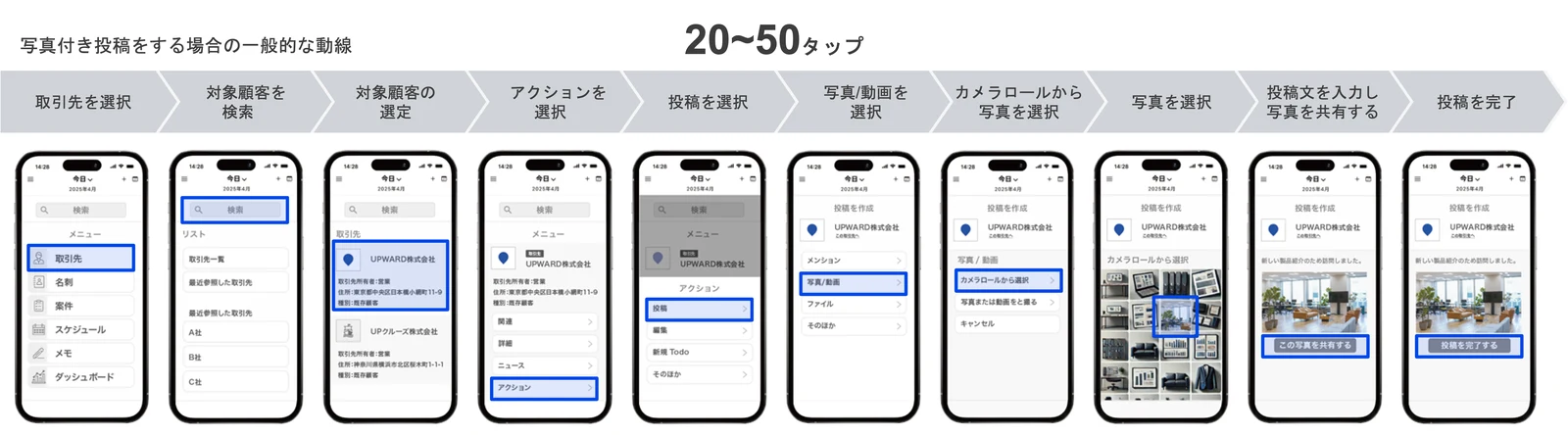
Old Daily Reports
Where did I go today, and what did I work hard on? I just jotted it all down.
CRM Activity Report
Find a business partner, select a contact person, and link the activity. Before I can even write the content, I have to tap the screen dozens of times. Since I can’t finish it right then and there, I end up having to come back to it later when I remember what I need to write.
Even if we streamline data entry, the details of sales meetings aren’t automatically recorded. Should we write in detail or wrap things up quickly? Under the current system, that decision is left up to each individual salesperson.
With UPWARD AI Speech, once a visit is over, a sales report is automatically posted to Salesforce at
.
Location data handles everything from starting and stopping recordings to linking them to customers.
- 1When you arrive, I'll suggest we record it.
When you arrive at your destination, you'll receive a notification on your smartphone asking, "Would you like to start recording?" Even for unscheduled, impromptu visits, you can select a nearby business partner.
- 2Record with a single tap
Just give your customer a quick heads-up and tap. You can record even when out of range, and it saves battery life.
- 3If you move away, it will automatically shut down.
When you leave the location you visited, the recording stops and the AI begins summarizing. You'll never forget to stop it.
- 4All that's left is to check it and send it.
Based on your Salesforce settings, this will include not only the summary text but also picklists and checkboxes. Just review the content and click the checkmark in the upper-right corner.
Comments that can influence a sales meeting—such as “We’re also looking at one other company’s service” or “I’ll check with my team to see if we can integrate by the next meeting”—
are also saved in Salesforce.
All you have to do is say, “May I take some notes? ( log?)” Just like asking for permission to take notes, people rarely object. In fact, some people have said that it actually sparked a conversation, with others asking, “How do you plan to summarize this?”
Items can be preconfigured to match your company's sales style.
- Was a quote submitted?
- Did you propose a new product?
- Were we able to identify the customer's challenges?
If you set this up, the AI will analyze the conversation and fill in the blanks accordingly. You can also adjust the summary length and headings based on the type of business meeting (such as a sales call, in-store visit, or briefing).
You can record even in places where there is no signal.
It is first saved on the device, and then the AI summarizes it when a connection is established.

Basement Conference Room

A Construction Site in the Mountains

Factory
If you're just taking minutes,
AI is already the norm.
UPWARD leaves behind more than just meeting minutes.
General AI Meeting Minutes
log.
- 1 Press the record button
- 2 Transcript
- 3 Summary
- 4 A person enters the data into the CRM
UPWARD AI Speech
Save this information in Salesforce so it can be used for future sales activities.
- 1 Detect arrival at the destination
- 2 We recommend recording
- 3 Automatically ends when you move away
- 4 AI Summary
- 5 Automatically link to the appropriate customer
- 6 This is a Salesforce activity report
Since you can see where you visited, this information becomes sales data that includes details such as “ who you met with, where you met, and what you discussed .” Because the data is recorded in a standardized format by category, it can also be used for future applications of AI and Agentforce. *“General AI Meeting Minutes” refers to the standard process of creating meeting minutes from meeting recordings. It does not refer to any specific product.
It's not just about conversations.
Send the information gathered in the field to
Salesforce.
What I talked about was AI Speech.
What I saw was AI Scan.
Anything you see is automatically imported into Salesforce just by taking a photo.
Handwritten application forms, equipment labels, and on-site signs. When photographed, AI reads the text and sorts it into individual fields. Using occupancy detection, the system automatically links the data to the appropriate customer. There are also industry-specific recognition models for items such as construction project signs and vehicle inspection certificates.
"UPWARD AI Scan" is a separate option from AI Speech. Please discuss with your account manager during your phone call whether you would like to use it in conjunction with AI Speech.
Here's how you can use it when referring to "our sales team."
Even with the same system, the information companies want to retain varies depending on the industry.
-
Finance Corporate Banking Officer / Corporate SalesDetermine the purpose of the visit and the conditions for the next steps through conversation log
If the "Purpose" field is left open-ended, the level of detail provided will vary from person to person, making it unusable for later analysis. By organizing and saving the information by category based on the conversation, you can compare data across branches. You can also set up a system for verifying report compliance that doesn’t rely solely on human review.
View Industry-Specific Materials -
Insurance Sales Representatives, Solicitors, and Agency Sales StaffWho I talked to and which products I discussed with them log
When you visit an agency, you end up talking to several recruiters. If you have to rely on your memory to keep track of who you explained what to, you won’t be able to develop a plan for the next steps. This tool lets you organize and save your conversations by topic.
View Industry-Specific Materials -
Real Estate Sales for Acquiring Land and PropertiesI will pass on the terms of the sale I heard from the landowner by the end of the day
I record the sellers’ intentions regarding the sale, the agreed-upon price, and when to follow up, based on my visits to property owners and real estate agents. Since the speed of the appraisal is key to securing the next lead, I enter the information I gather into the system the same day.
View Industry-Specific Materials -
Residential Equipment After-Sales Service and Distributor SalesIntentions to replace equipment identified during inspections log
That one phrase—“It’s about time to replace it”—that comes up when we visit for inspections or repairs. I’ll record the details of the proposal and the timing here. Even if the person in charge changes, this information can be passed on as is.
View Industry-Specific Materials -
Building Materials Sales Representative Visiting Retailers and ContractorsThe quantity for each property and the delivery date log
Discussions about the schedule, quantities, and delivery dates for projects that came up during the meeting—even a single comment about how far other companies have progressed—are all documented. These consultations, which take place before we submit a quote, serve as the basis for our next proposal.
View Industry-Specific Materials -
Food Sales Representatives and Field Representatives Visiting Facilities and StoresRearranging the shelves, feedback on new products, and tasks for next time log
I’ll leave these as tasks for next time: the timing of shelf rearrangements, the store’s response to new products, and other items to address. You can also configure the system to adjust the summary format based on the type of business meeting, such as visits, store inspections, or tasting events.
View Industry-Specific Materials
Swipe left or right with your finger to switch between business categories.
To find out how this could be used in your company, please feel free to contact our representative at
.
You can choose to consult over the phone or review the materials first.
-
Sign Up for a Free Consultation
Our representative will work with you to determine what information to include in your visit report to make it most effective and whether it can be applied to your current contract.
- It takes about 30 to 60 minutes.
- We'll check on the spot whether it's included in your contract or if you need to add it.
- I'll also show you an example of settings that match your company's report template.
- We’ll also explain how to expand these capabilities to include web conferencing, phone calls, and images.
-
Download info pack
I am sending you the AI Speech documentation (PDF). Please feel free to share it with your colleagues and review it before our call.
What is written in the document
- The process from arriving at the client's office to starting the recording and entering a summary into Salesforce
- Differences in operation compared to other products
- Recording That Isn't Dependent on Network Conditions and Our Approach to Security
It takes about a minute to complete the form. We will send it to the email address you provided.
Please describe the matter you'd like to discuss. A representative will contact you.
The information you provide will be handled in accordance with UPWARD Co., Ltd.’s Privacy Policy. We will not engage in aggressive sales tactics.
DOWNLOAD FORMS SECTION
On the live page, the form to request materials will appear here. Please enter your name, company name, phone number, email address, department, job title, and how you heard about UPWARD, and we will send you the materials.
Download the materialsThe information you provide will be handled in accordance with UPWARD Co., Ltd.'s Privacy Policy.