

"UPWARD AI Scan": Simply take a photo of objects on-site to convert them into data
No need to transcribe anything or search for business partners. The moment you take a photo , it’s sent—along with the location—
to Salesforce.
Whether it's a construction project sign at the job site, a handwritten application form, or a machine nameplate—
—AI reads each item and enters the information, along with the location where the photo was taken, into Salesforce.
This is our 10th year specializing in field sales. Our solution has been adopted by approximately 450 companies.





































I do take photos. But the information in the photos won't be preserved unless I retype it by hand at
.
These are the comments left on Salesforce by three people who passed by the same construction site on the same day.
-
I took a photo of Mr. A's sign 6 itemsBuilding Owner / Contractor / Use / Total Floor Area / Scheduled Start Date / Site Address. Based on the location where the photo was taken, a record of the site was created on the spot.◯ Since the scheduled start date is included, we can plan our schedule by working backward from when the materials will be needed. This logcan be used as-is for the next proposal.
-
I only uploaded Mr. B's photo 0 itemsI attached just one photo of the sign to my Salesforce activity report. I left all the fields blank.✕ Although the photo remains, neither the scheduled start date nor the contractor is listed. Even when searching for “construction sites starting next month,” this site doesn’t come up.
-
Copied into Ms. C's notebook 6 itemsI copied the information into my notebook in front of the sign and set it on my desk. I’ll enter it into Salesforce in three days.✕ I’ll re-examine the order of magnitude of the total floor area and the start date based on my memory from three days ago and my handwritten notes. During those three days, no one else knew about this site.
This isn’t just about construction sites.
Store shelves, paperwork received during client visits, installed equipment, and exchanged business cards.
The more information sales reps find in the field, the more time-consuming it is to log it into Salesforce.

Site information that has not been entered cannot be used for the next business day or for handoffs.
Even though we saw the information on-site, it wasn't recorded in Salesforce. We don't realize this until after our competitors have already taken the business.
It's not the people who are at fault—it's the system.
I'm too busy on site to take a break. So I'll have to enter the data when I get home.
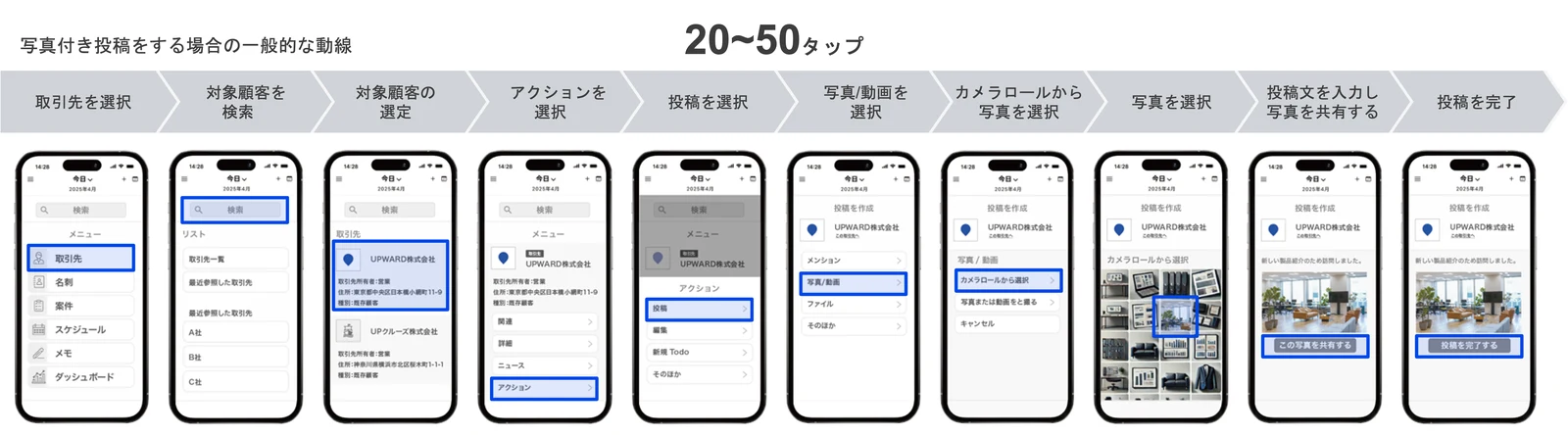
If we try to record everything accurately, it takes more time. If we cut down on the effort, the amount of information recorded in Salesforce decreases. Under the current system, that decision is left up to each individual sales representative.
With UPWARD AI Scan, you can complete the registration in Salesforce right on-site.
Simply take a photo to convert the information you need from the field into Salesforce data.
Since the location where the photo was taken is also recorded, you can plan your next route using a map.
- 1Once I get there, all I have to do is take a picture.
You don't need to search for a customer, open a record, and then enter the information. When you take a photo, it's automatically saved along with the location details. If the location isn't already in Salesforce, it will be added as a new entry.
- 2The AI reads the items.
Construction information on signs, fields on application forms, and model and serial numbers on nameplates. AI separates the text visible in the photos into individual items.
- 3It goes directly into the Salesforce field
This is not a photo attachment. Information such as the building owner, total floor area, and scheduled start date is entered as text for each field. You can also link to the relevant records by referencing the product master or item master.
- 4Just check it and send it
Review the scanned information on the screen, then send it. The registration in Salesforce will be complete before you leave the site.
Are you still entering this kind of information manually?
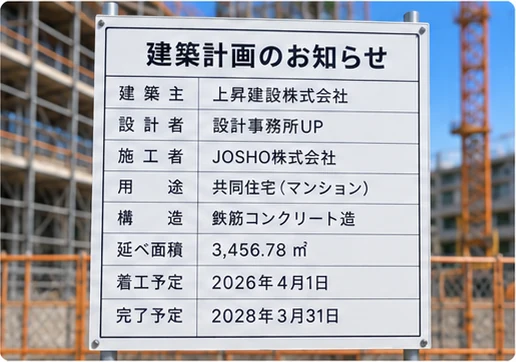
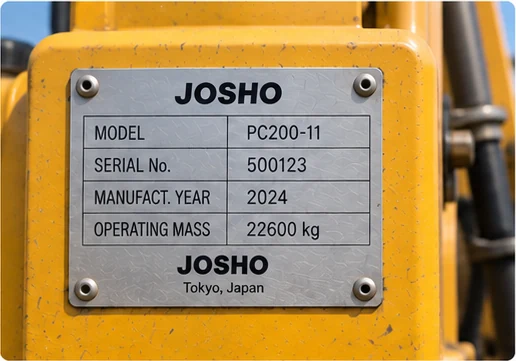
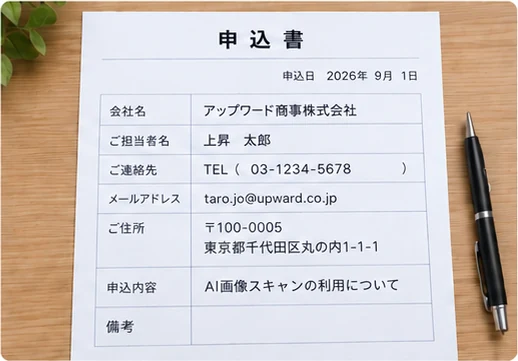



Just take a photo, and everything will be entered into Salesforce.
When it comes to simply reading text, AI is already the norm.
Along with the text, UPWARD leaves behind that place.
AI-OCR for Reading Forms
From reading the paper forms to completing the registration.
- 1 Import Forms
- 2 AI Reads Text
- 3 Check the screen and assign items
- 4 Register in CRM
- 5 Location information is not saved
UPWARD AI Scan
Leaving everything as it is on-site, keeping it in place, and ensuring it leads to the next visit.
- 1 Taking Photos on Location
- 2 AI reads each item
- 3 Entering Salesforce Fields
- 4 The location where the photo was taken is also saved
- 5 Next on the list, after the map
- 6 Remains as an activity
*“AI-OCR for Reading Forms” illustrates the general workflow of a service that converts paper forms—such as invoices and application forms—into data. It does not refer to any specific product.
Since the location where the photo was taken is recorded, this data provides sales teams with details such as “which customer” and “which job site.” Because the data is organized by category, it also lays the groundwork for future use of AI and Agentforce.
What I saw was AI Scan. What I said was AI Speech. It’s not just about what I saw .
What I said on-site is also sent to Salesforce.
A single photo and a conversation come together to form a single visit: log.
When you arrive at a client’s office, UPWARD recommends recording the call, and the recording stops automatically when you leave. The AI summarizes the conversation and fills in Salesforce fields such as “Quote Submission,” “Customer Issues,” and “Next Steps.”
Here's how you can use it when referring to "our sales team."
Even if the mechanism is the same, the characters you see on-site vary depending on the industry.
-
Building Materials and Construction Equipment Rental Field-Based SalesFind upcoming job sites by looking at the signs
Simply take a photo of the construction plan notice posted at the site, and the information—including the building owner, contractor, total floor area, and scheduled start date—will be automatically entered. You can start preparing before construction begins by working backward from the date materials are needed.
View Industry-Specific Materials -
Residential Equipment Manufacturers Sales Representative for Builders and Construction CompaniesGo to the construction site before work begins to finalize the specifications in advance
The equipment is selected before construction begins. Once the building owner and contractor can be identified from the sign, you can approach the builder with a proposal before the blueprints are finalized. This is the method officially recommended by home appliance manufacturers as a target industry.
View Industry-Specific Materials -
Industrial and Agricultural Machinery Sales and Service for Rental and Installed EquipmentEnter the model and serial numbers of the equipment you loaned exactly as they appear in the ledger
Simply take a photo of the label on the machine you've left at a dealer, and the model type and serial number will be automatically entered. Since the system automatically links the machine to the dealer based on the location detected during your visit, you'll no longer miss any entries in the ledger at log.
-
Insurance and Finance External Relations and Agency SalesConvert handwritten application forms and documents into digital data on the spot
Take photos of application forms and other documents filled out at the client’s location, and save each field as a separate entry. This eliminates the time lag between taking the forms home and entering the data, as well as errors caused by transcribing the information by hand. Business cards can be registered using the same process.
View Industry-Specific Materials -
Food Sales Representatives and Field Representatives Visiting Facilities and StoresSave the store shelves and product labels to your visit at log
Just by taking a single photo of a shelf, you can keep track of the number of product faces and out-of-stock items for both your company and your competitors without having to count them manually. The next time you visit, you can discuss how the sales floor looked during your previous visit while viewing the screen.
View Industry-Specific Materials -
Real Estate Sales for Acquiring Land and PropertiesAdd the paper materials received from the real estate agent to the property information
You can take photos of paper documents, such as sales floor plans, that you receive while visiting real estate agents and save them on the spot. Since we have not yet publicly disclosed any case studies regarding its implementation in the real estate industry, please consult with your account manager regarding how to use it.
View Industry-Specific Materials
Swipe left or right with your finger to switch between business categories.
Scroll left and right to view other industries.
In fact, by recording field data in Salesforce,
even the way our sales team operates has changed.
Both are current users of AI Image Scan.

Asahi Kizai Co., Ltd.: Rental, Leasing, and Sales of Construction Materials; Construction Services
Before the change We used to manually enter all the information—such as the total floor area and construction details—listed on the sign.Changes Made We began using AI image scanning to capture on-site signs and register them as worksite information.Changes Significantly reduced the time required for entering new information. By digitizing the next visit date, we prevent “lost deals due to inaction” and reduce missed opportunities. Improved information sharing among staff members has led to smoother collaboration within the sales team.The signs contain detailed information such as total floor area and construction overviews, but until now, we had to enter all of that data manually. With UPWARD, we can simply take a photo with our smartphones and the information is converted to text, which has significantly reduced the amount of data entry work. Ms. Hiroe Sugawara, Section Chief, Temporary Facilities Section, Sales Division 2, Head Office
Read Case Studies
Oreck Co., Ltd., Agricultural Machinery Manufacturer
Before the Change We used to manage the lending of equipment to dealers manually using paper and Excel. logThis led to oversights, and it was difficult to track the lending status.Changes Made We took photos of the machines to automatically capture their “model type” and “model number.” Borrowers are automatically linked to the equipment based on presence detection. The inventory ledger is built on Salesforce.What's New All sales representatives can now monitor the latest loan status in real time. The data entry workload has also been significantly reduced. Sales offices that conducted the PoC have reported that the process has become “easier.”There were times when we forgot to take notes, or even when we did take notes, failed to record them in the ledger. We tried using Excel and other tools, but they didn’t reduce the workload, and since we have a large number of GPS devices, the cost was also a challenge. Challenges prior to implementation (from the press release)
Read the Public Release

All of the above is based on information contained in publicly available case studies and press releases. The statements are quoted verbatim from the original text, and neither the context nor the tense has been altered.
Click here to inquire about AI image scanning
-
Sign Up for a Free Consultation
Our representative will work with you to determine what footage will be most effective at your company's worksite and what can be used under your current contract.
- It takes about 30 to 60 minutes.
- We'll check on the spot whether it's included in your contract or if you need to add it.
- We can also discuss which Salesforce fields to map the captured data to.
-
Download info pack
I am sending you the UPWARD service overview (PDF). Please feel free to share it with your colleagues and review it before our call.
- It takes about a minute to complete the entry.
- We will send it to the email address you provided.
- Here is a summary of what you can do with UPWARD, including AI image scanning.
Please describe the matter you'd like to discuss. A representative will contact you.
The information you provide will be handled in accordance with UPWARD Co., Ltd.’s Privacy Policy. We will not engage in aggressive sales tactics.
I am sending you the UPWARD service overview (PDF).
It provides a comprehensive overview of what UPWARD can do, including AI image scanning.
DOWNLOAD FORMS SECTION
On the live page, a form to request our service brochure will appear in this location. Please enter your name, company name, phone number, email address, department, job title, and how you heard about UPWARD, and we will send you the brochure.
Download the materialsThe information you provide will be handled in accordance with UPWARD Co., Ltd.'s Privacy Policy.